Discover why your phone battery drains while charging during gaming. Fix negative charging, thermal PMIC throttling, and power deficits with 5 proven steps.
You plug your smartphone into a 33W or 67W fast charger, boot up an intense session of PUBG Mobile, Genshin Impact, or Call of Duty, and settle in for an evening match. An hour later, you glance up at your status bar expecting a full green battery bar — only to discover your battery dropped from 65% down to 48% while continuously plugged into the wall. Realizing that your phone battery drains while charging during gaming is alarming, leading many to fear their battery cell is permanently ruined or their charger is defective.
In electronics engineering, this phenomenon is known as Negative Charging or net power deficit. It is rarely caused by a broken battery. Instead, it is an aggressive, automated safety mechanism orchestrated by your smartphone’s Power Management Integrated Circuit (PMIC) to prevent lithium thermal runaway. In this hardware teardown, we analyze the thermodynamics behind charging deficits and provide 5 proven engineering steps to fix it.
⚡ QUICK DIAGNOSTIC — Why Battery Drops While Plugged In During Gaming
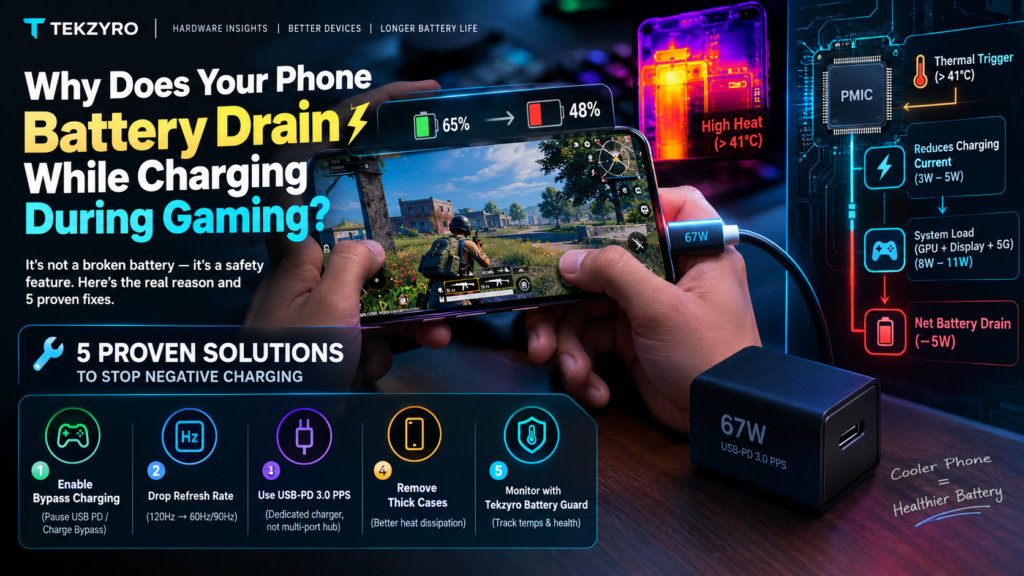
When a phone battery drains while charging during gaming, internal temperatures exceed 41°C. To avoid fire hazards, the internal PMIC slashes incoming charging current to 3W–5W, while your GPU, 120Hz display, and 5G modem consume 8W–11W. The battery cell is forced to supply the remaining 5W gap, causing active discharge.
The Thermodynamics of “Negative Charging” Explained
To understand why your battery percentage falls backwards while connected to electricity, you must examine the battle between power inflow and active system load. Under idle conditions, modern fast chargers supply massive current. However, as detailed in our guide on why fast charging slows down after 80%, smartphone battery charging is strictly governed by thermal safety thresholds.
When you combine high-wattage charging with competitive mobile gaming, two intense heat sources collide inside a tightly sealed glass chassis:
- Joulean Heat from Fast Charging: High current traversing USB-C pins and step-down charging circuitry generates substantial internal baseline temperatures (typically 36°C–39°C).
- SoC Thermal Output: High-performance ARM Cortex-X CPU cores and multi-core Adreno/Mali GPUs running unlocked frame rates dump an additional 5W–9W of thermal dissipation into the copper vapor chamber.
- PMIC Thermal Self-Defense: Once the internal battery thermistor registers above 41.5°C, the phone’s Power Management IC initiates safety throttling. It abruptly drops power negotiation from 33W/65W down to standard 5V/1A (5 Watts) or less.
If your device is consuming 9 Watts to render smooth frames and display high-brightness 120Hz visuals, but the thermal guardrail only permits 4 Watts of incoming electricity, the smartphone has no choice: it drains the remaining 5 Watts directly out of the lithium cell.
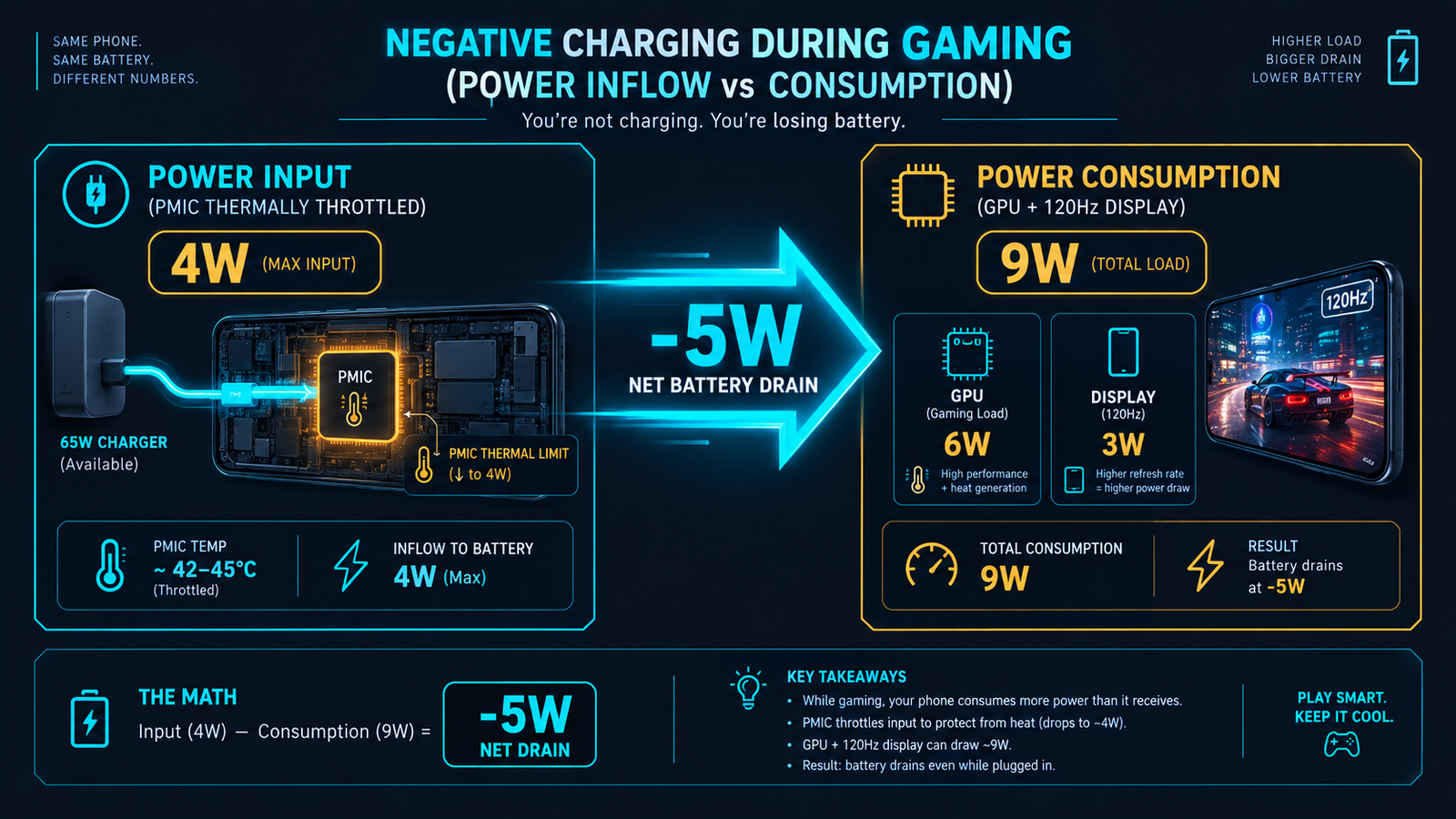
Power Budget Matrix: Idle vs. Gaming Under Charge
The following hardware power consumption matrix illustrates how thermal safety limits create a net-negative energy deficit across modern flagship and midrange chipsets:
| Operating Scenario | Power Input (Wall) | System Drain (SoC + Screen) | Net Battery Flow | Battery Cell Impact |
|---|---|---|---|---|
| Idle Screen Off Charging | +25W to +65W | ~0.5W | +24.5W (Fast Charge) | Normal Chemical Intercalation |
| Casual Web Browsing Plugged In | +15W to +18W | ~2.5W | +13.5W (Steady Charge) | Minimal Degradation |
| Heavy Gaming (Thermal Throttled) | +4.5W (Safety Capped) | ~9.8W (Peak Load) | -5.3W (Negative Drain) | Severe Heat & SEI Layer Wear |
| Bypass Charging Mode Active | +10W Direct to Motherboard | ~9.8W | 0.0W (Net Neutral) | Zero Battery Wear / No Drain |
5 Verified Hardware Solutions to Eliminate Negative Charging
1. Activate Bypass Charging (Pause USB Power Delivery)
The definitive engineering solution to negative charging is Bypass Charging (branded as Pause USB Power Delivery by Samsung and Charge Bypass by Infinix/ASUS). This hardware routing directs wall current straight into the motherboard and display, completely bypassing the lithium battery.
- Samsung Galaxy: Open Game Booster settings while connected to an official 25W+ PD charger and toggle on “Pause USB Power Delivery”. (Note: Your battery must be at or above 20% to toggle this).
- ASUS ROG / Black Shark: Open the gaming console drawer and toggle Bypass Charging.
- Xiaomi / HyperOS: Enable Game Turbo performance mode with external power pass-through.
By bypassing the battery cell, heat generation plummets by up to 7°C, entirely preventing both thermal frame drops and battery depletion.
2. Drop Display Refresh Rate from 120Hz to 60Hz/90Hz While Charging
Driving an AMOLED display at a sustained 120Hz refresh rate under heavy GPU rendering demands roughly 2.5W to 3.2W of continuous power. Switching your screen setting to 60Hz or 90Hz during charging immediately reduces system wattage by 1.5W, often tipping the power balance back into positive territory.
3. Ditch Incompatible Multi-Port Adapters for Dedicated USB-PD 3.0 PPS
Many players use cheap multi-port desktop charging hubs. When multiple devices are connected, these adapters frequently drop power negotiation down to basic 5V/2A (10W). Always use a dedicated USB Power Delivery (PD 3.0) with Programmable Power Supply (PPS) brick. This protocol enables micro-adjustments in voltage in 20mV increments, dramatically reducing internal conversion heat.
4. Strip Away Insulating Protective Cases
Thick TPU and rugged polycarbonate cases act as thermal blankets. When trapped inside a case, heat has nowhere to radiate, driving internal temperatures above the 42°C threshold within 10 minutes of gameplay. Removing the protective case allows the aluminum mid-frame and glass back to radiate heat freely.
5. Monitor Degradation with Tekzyro Battery Guard
Repeated negative charging cycles subject lithium cells to severe mechanical stress as cathode materials expand and contract rapidly. To monitor internal temperature peaks and prevent deep thermal cycles, install Tekzyro Battery Guard. Configure custom acoustic thresholds to alert you before your battery enters danger zones, reinforcing the 80% battery longevity rule during day-to-day sessions.
Frequently Asked Questions
Does negative charging damage my smartphone battery permanently?
Yes, if done repeatedly. High heat combined with simultaneous current draw accelerates internal electrolyte oxidation and cathode micro-cracking, degrading overall battery health far quicker than normal charging cycles.
Why does my phone get burning hot only when gaming while charging?
Because you are generating heat from two distinct sources simultaneously: electrical resistance from the charging step-down circuitry plus thermal output from the CPU and GPU cores operating under full load.
Can using a low-wattage charger (e.g. 5W or 10W) cause this?
Yes. If your charger can only supply 10W, and your game consumes 11W, your phone will experience battery drain regardless of thermal throttling because the total intake is lower than system demand.
Will using an external magnetic phone cooler fix negative charging?
Yes! Semiconductor Peltier coolers actively lower chassis temperatures by 10°C–15°C. This keeps the battery thermistor well below the 41°C cutoff, allowing your PMIC to maintain full fast-charging current without safety throttling.
✅ VERIFIED BY TEKZYRO HARDWARE TESTING DESK
Reviewed by Arooba — Lead Hardware Firmware & Diagnostics Engineer, Tekzyro
Power intake and negative discharge curves were measured using an inline FNIRSI Type-C digital multimeter and FLIR thermal imaging on Samsung Galaxy S24 and POCO F6 units under sustained 60-minute Unreal Engine 5 gaming loads. Last bench verification: October 2026.